
In public relations, strong communication is about more than writing a press release or managing social media. Visual storytelling plays a major role in how audiences connect with brands, organizations and campaigns. Two of the most valuable tools for creating professional visual content are Adobe InDesign and Adobe Photoshop. Together, these programs help PR professionals produce polished designs that strengthen brand identity and improve audience engagement.
Adobe InDesign: The Foundation of Professional Layout Design
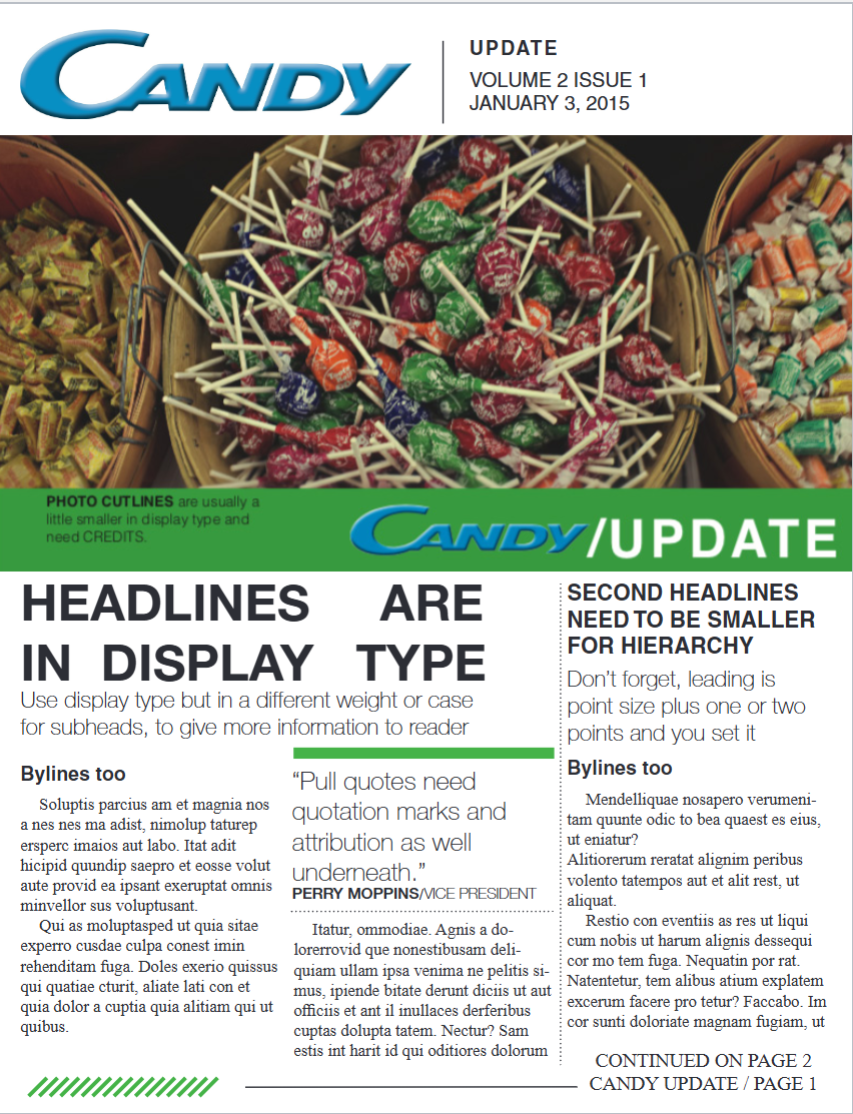
Adobe InDesign is one of the most important programs for creating professional publications and marketing materials. PR practitioners use it to design brochures, magazines, business cards, newsletters, media kits and event materials. What makes InDesign powerful is its ability to organize large amounts of text and images into clean, visually appealing layouts.
One of the most useful features in InDesign is the ability to work with grids, guides and columns. These tools help designers maintain consistency throughout a project, which is essential for professional communication. InDesign also makes it easy to manage typography, spacing and alignment, allowing PR professionals to create designs that look organized and easy to read.
Another feature I found especially valuable is the ability to place and resize images efficiently using keyboard shortcuts. Small workflow improvements like this save time and make the design process much smoother when working on tight deadlines.
Below is an example of an InDesign page I created:
Adobe Photoshop: Enhancing Visual Communication
While InDesign focuses on layout and organization, Adobe Photoshop is designed for image editing and visual enhancement. PR professionals frequently use Photoshop to edit promotional images, adjust colors, remove distractions and create graphics for campaigns and social media.
What makes Photoshop unique is the level of creative control it gives designers. From simple adjustments like brightness and contrast to more advanced editing techniques, Photoshop allows communicators to create visuals that align with a brand’s message and identity. High-quality visuals are especially important in public relations because audiences often form first impressions based on design and imagery.
Photoshop also helps PR professionals maintain consistency across multiple platforms. Whether creating graphics for a website, a social media campaign or a printed publication, the program allows designers to ensure images look professional and cohesive.
How PR Professionals Can Continue Learning
The best way to improve design skills is through practice and experimentation. Online tutorials, LinkedIn Learning courses and Adobe’s own training resources make these programs accessible to beginners and experienced professionals alike.
I have found that working directly inside the programs and experimenting with layouts, typography and image placement helps build confidence much faster than simply reading about design concepts. Over time, these technical skills become valuable tools for creating more effective communication campaigns.
Both Adobe InDesign and Photoshop provide resources and videos to help guide beginners. PR practitioners can learn more about these programs through the official Adobe website.
What Makes A Good Design?
Even the most advanced software cannot replace strong design principles. Good PR design is not simply about making something look attractive. Effective design should communicate a message clearly, support the organization’s goals and create a positive experience for the audience.
Several design principles are especially important in public relations:
Typography and Readability
Typography affects how audiences process information. Fonts, spacing and hierarchy should make content easy to read and visually organized. Poor typography can make even strong content appear unprofessional. I previously explored this topic in greater detail in my article, The Power of Typography. In that post, I discuss how font selection, spacing and visual hierarchy influence readability, branding and audience perception.
Balance Between Form and Function
Design should balance creativity with usability. A visually appealing design that is difficult to navigate will not effectively communicate its message. Successful PR materials combine strong aesthetics with practical communication.
Consistency and Branding
Consistency helps organizations build recognition and trust. Colors, fonts and layouts should align with the brand’s overall visual identity across all platforms and materials.
References
Adobe. (n.d.). Adobe InDesign tutorials. Adobe. https://www.adobe.com/products/indesign.html?sdid=9WGN3VD3&mv=search&mv2=paidsearch&ef_id=ca11e96106e61ebd7565837b472efe31:G:s&s_kwcid=AL!3085!10!78890158274402!!!!20541716235!!61305002!1721980290.
Adobe. (n.d.). Photoshop learn & support. https://www.adobe.com/education/students/creativecloud.html?sdid=VPM4K1VT&mv=search&mv2=paidsearch&s_kwcid=AL!3085!10!79508633594834!!!!20793058843!!61455535!2393154075&ef_id=972c04a8dba814de032f6eb299599c64:G:s&mv=search.
Miller, R. (2026, May 26). The power of typography. Rily Miller. https://rilymiller.com/the-power-of-typography/.